Ship without
a QA team.
testra is an autonomous AI QA engineer: it drives a real browser through your app, tries to break it, and hands you triaged, reproducible bug reports — before your users find them.
- less time spent testing
- 90%
- of bugs caught before production
- 99%
- autonomous coverage
- 24/7
- test scripts to maintain
- 0
Testing is the job nobody has time to do right.
incident · manual qa
Manual QA doesn't scale
Hours of clicking through the same flows before every release — and the bug still ships, because nobody re-tested the one page that changed.
incident · e2e suites
E2E suites rot
Selectors break, tests flake, CI goes red for the wrong reasons. The suite becomes something you maintain instead of something that protects you.
resolution
testra replaces both with an agent that explores like a human and verifies like an engineer.
Point it at your app and it drives a real browser through every page, presses every button, submits every form, checks the database behind your flows — and files deduplicated, severity-ranked findings with the evidence attached. No scripts. No selectors. Nothing to maintain.
An autonomous QA engineer, not another test framework.
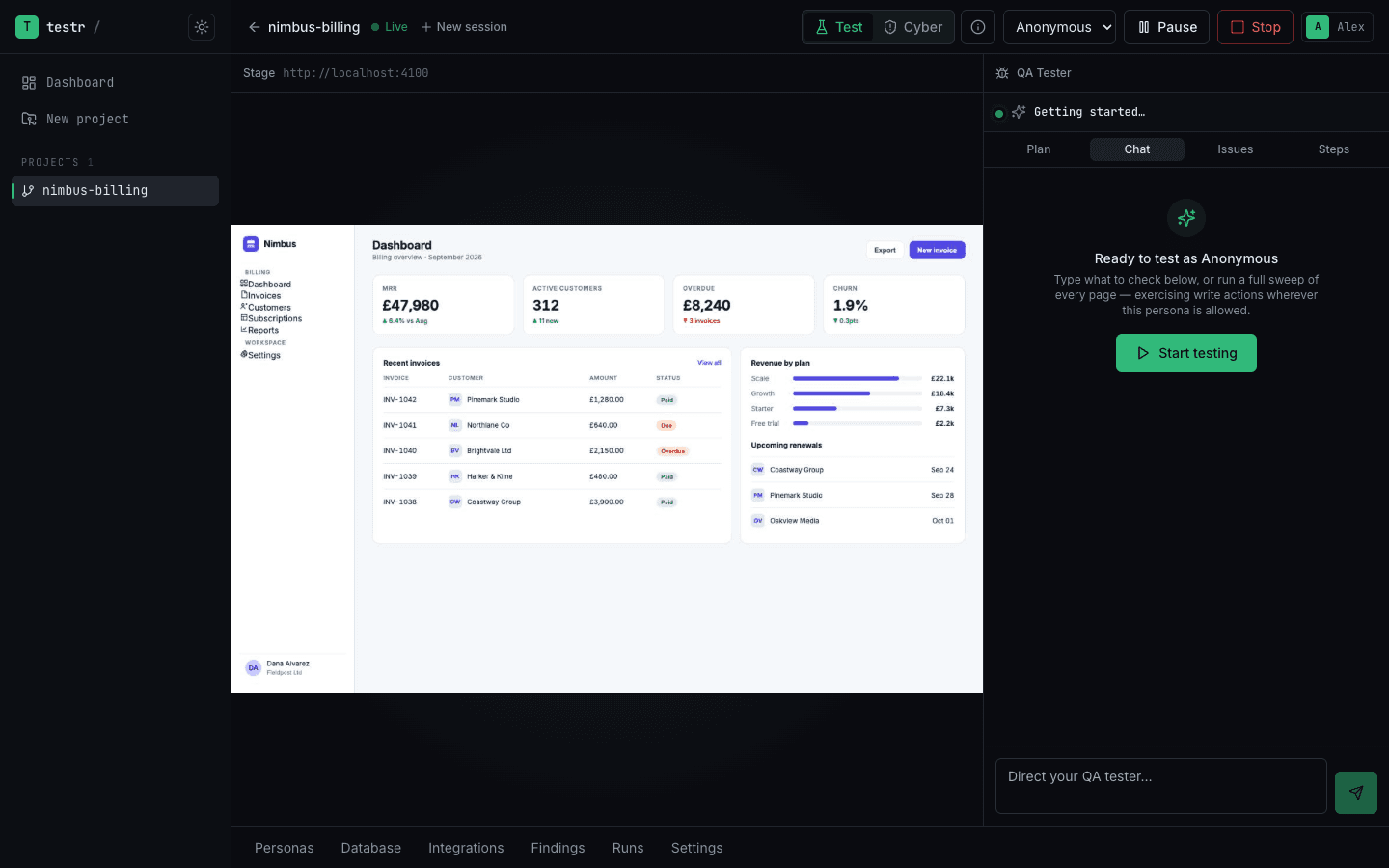
02.1The cockpit
Watch it work. Steer it live.
Mission control for your QA agent: a live screencast of the real browser it's driving, the coverage plan it's working through, and a chat box to direct it mid-run — "focus on checkout", "try to break the invite flow". Findings appear in the rail the moment it hits one.
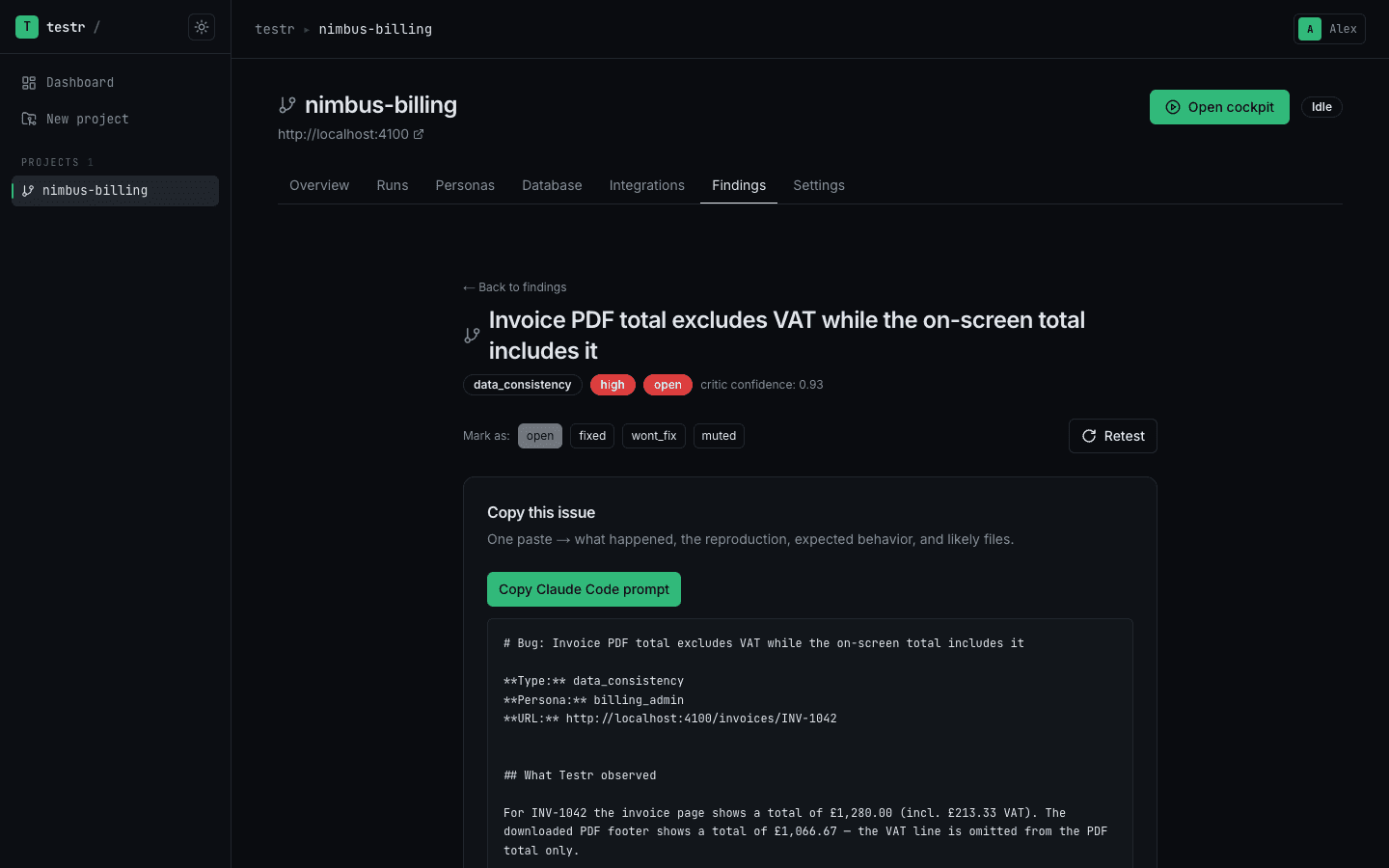
02.2Findings
Bug reports an engineer would write.
Every finding ships with what happened, the exact reproduction, expected behaviour, the URL and persona — plus a one-click prompt for your coding agent to go fix it. An independent critic scores each one before it reaches you, so you're not triaging noise.
02.3Overview
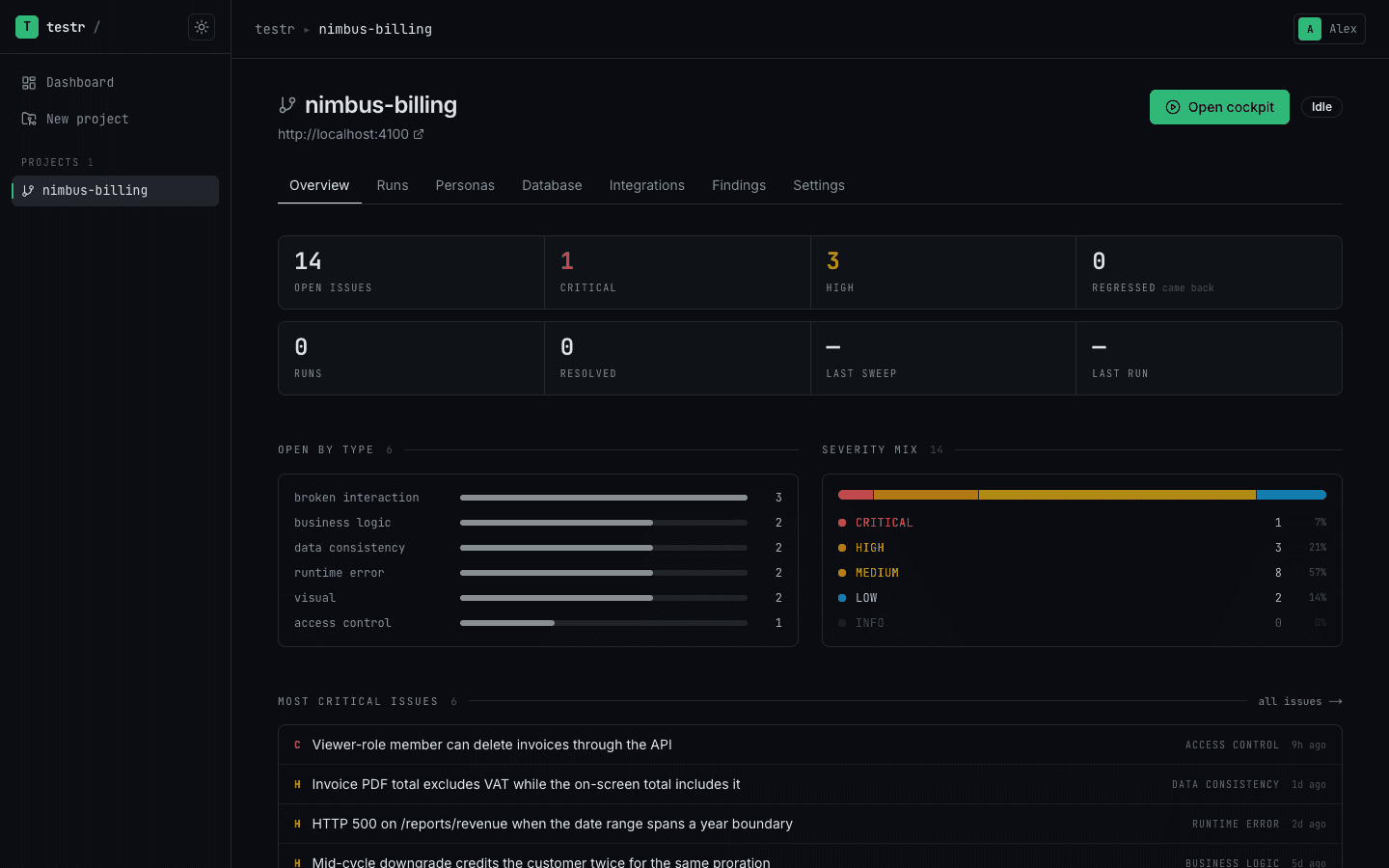
Your quality posture at a glance.
Open issues by severity and type, run history, coverage of the last sweep, and the most critical problems to fix first — one dashboard per project, always current, driven by real runs instead of wishful dashboards.
- CAP-01
Full-sweep coverage
The agent builds a checklist of every page, section and write action — then drains it. No cherry-picking the happy path.
- CAP-02
Cyber Mode
Flip one switch and the same agent turns adversarial: access control, injection, session integrity, business logic — every attempt logged into an audit report.
- CAP-03
Personas & multi-account
Signs in as each of your user roles and verifies cross-account effects from the receiving side — the bugs single-user tests can't see.
- CAP-04
Reproducible findings
Every bug ships with the exact recorded steps behind it, so you — or your coding agent — can reproduce it without guessing.
- CAP-05
Built-in critic
An independent reviewer scores every run for thoroughness before it counts. If the sweep was shallow, testra says so.
- CAP-06
AI feature testing
Finds the AI surfaces in your app — chatbots, generators, AI documents — and probes them for accuracy, hallucinations, persona drift and guardrail bypasses like prompt injection.
From a local folder to bug reports in one session.
t+0 · boot
Open your project in the Mac app
Install the desktop app and pick the folder your app lives in — testra boots it locally. Add test accounts and a database connection for deeper verification.
t+1 · sweep
The agent sweeps it
It maps every route, plans the coverage, then drives a real browser through every page and write action, watching the console, the network and your data.
t+2 · triage
Triage real findings
Deduplicated, severity-ranked bug reports with reproductions and evidence land in the app, ready to hand to your coding agent.
Wire testra into your coding agent.
The desktop app runs an MCP server on your machine — connect Claude Code, Codex, or any MCP client and it can do everything you can, short of billing: create projects, boot apps, run tests, and pull findings. Close the loop without leaving your editor, and without your code leaving your laptop.
start_runKick off a full sweep of your app from the agent.
wait_for_runBlock until it finishes — no dashboards to babysit.
get_findingPull each bug with a ready-to-paste fix prompt and the likely files.
start_runFix it, then run again to confirm the bug is gone.
$ claude mcp add --scope user testra \
    -e TESTRA_MCP_TOKEN=$TESTRA_TOKEN -e ELECTRON_RUN_AS_NODE=1 \
    -- /Applications/Testra.app/Contents/MacOS/Testra \
       /Applications/Testra.app/Contents/Resources/mcp-bridge.cjs

✓ testra connected · 24 tools available
Mint a token in the desktop app under Settings → MCP access tokens — it prints this command with the paths filled in. No port to keep in sync. Read the docs →
Questions, answered.
Q-01What is testra?
testra is an autonomous AI QA engineer. It drives a real browser through your web app, exercises every page and write action while watching the console, the network and your data, and hands you triaged, reproducible bug reports — before your users find them.
Q-02How is testra different from Playwright or Cypress test suites?
There are no test scripts to write or maintain. Instead of replaying the paths you thought to script, testra explores your app the way a human tester would — it maps every route, plans the coverage, then tries to break what it finds. That's how it catches the bugs your suites were never written to look for.
Q-03Which apps and frameworks does testra work with?
Any web app you can run on your own machine, regardless of framework — testra boots it from your project folder and drives it in a real browser. Give it optional test accounts and a database connection and it verifies what actually persisted, not just what the UI claimed.
Q-04Does my source code leave my machine?
No. testra is a macOS app: the browser, the database and the agent all run on-device against a folder on your Mac, using your own Claude subscription or API key — nothing about your source is uploaded.
Q-05How much does testra cost?
The Free plan costs nothing: try testra on your own machine. Starter is $20/month for unlimited runs across more projects, and Pro is $40/month for unlimited projects plus branded run and project reports. Monthly billing, cancel anytime.
Q-06Can coding agents like Claude Code use testra?
Yes. testra ships an MCP server, so coding agents can create projects, launch QA runs, wait for results and read findings directly — your agent writes the code, testra tells it what broke.
Something else? Talk to us — we reply within a business day, support@testra.io works too.
04report · session complete
Put an autonomous QA engineer on your team today.
Download the Mac app, point it at your project, and watch the first findings arrive in minutes.
Free: 1 project, 3 runs a week · See plans · Already testing with us? Log in